In this article
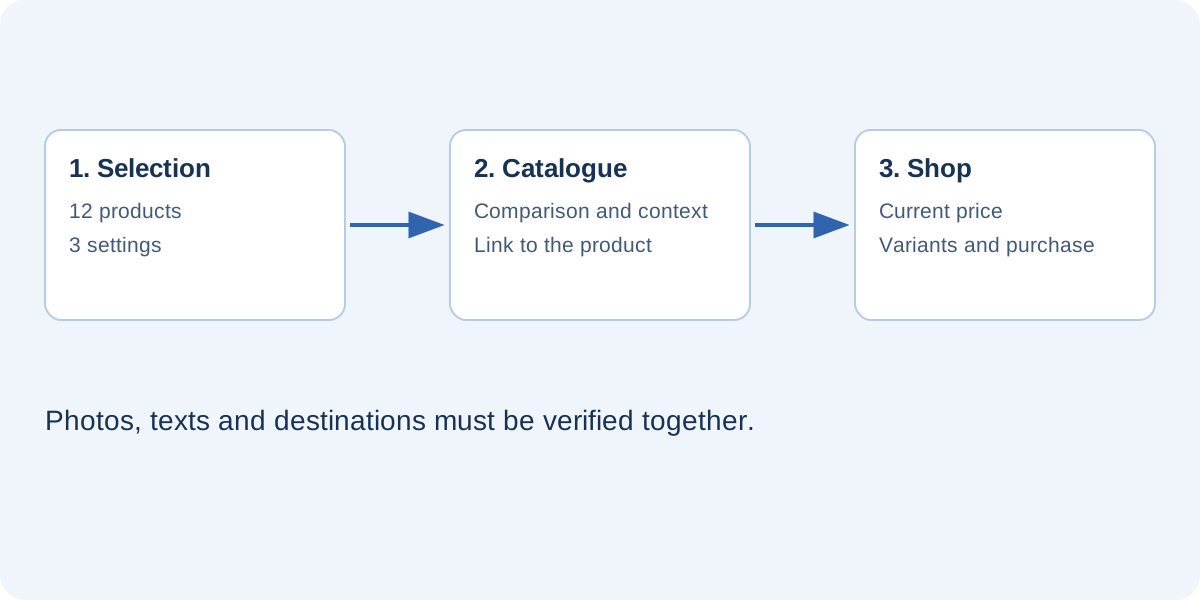
A flipbook catalog presents a selection of products in a deliberate order: a collection, a set of combinations or a gift guide. The online store remains the place to check availability, choose variants and complete a purchase. Keeping these roles separate prevents a common mistake: turning the catalog into a second product database that quickly becomes incomplete. The publication should help customers make a choice, while the store handles the transaction.
Consider a small lighting shop with sixty products. Its first catalog might feature twelve lamps for three different settings, rather than sixty nearly identical product entries. This example shows how to plan content and maintenance, whatever application you use to design the pages.
Start with a customer’s question
Before choosing a page size or designing a cover, identify the decision you want to support. “Which lamp fits a small desk?” is more useful than “How can we show our entire range?” That question determines the categories, photographs and features to explain. For a home office, footprint, light direction and adjustability may matter more during an initial visit than the supplier’s internal reference number.
Write a short editorial brief describing the audience, purpose and next action. A consumer publication may lead to a purchase; one intended for designers may direct readers to technical specifications or an enquiry. Both purposes can coexist, but the page needs a clear hierarchy so readers understand which route applies to them.
Build a short, complete structure
For this example, use a cover, contents page, introductions to the three settings, selected product pages and contact information. Category names should make sense to customers rather than simply reproduce internal department names. Give each spread a recognizable theme and limit its main messages. One strong photograph, two comparable products and a useful explanation may communicate more than a dense grid of thumbnails.
Prepare the following information before designing each entry:
- The public product name and a reference matching the online store.
- A photograph you are entitled to use and a useful description.
- The features that genuinely distinguish the item from alternatives.
- Its destination URL and the date the information was checked.
A practical reading sequence
Start with lighting for work, continue with lighting for reading and finish with ambient lighting. Explain concrete differences within each section. This gives customers a reason to browse, whereas a purely alphabetical list often repeats a job the store’s search function already performs.
Link each product to the right destination
A “View this lamp” button should open that lamp’s product page, not the store homepage. Where variants exist, decide whether the destination should be a product family or a specific version. For a specific finish, check what happens when it becomes temporarily unavailable. Avoid session-dependent links, personal shopping carts and URLs copied from administration screens.
When duplicating a page, check the photograph, name, product code and URL separately. Replacing a picture does not automatically change an existing button. Keep a simple record of page numbers, products and destinations. It will make final checks faster and help you locate mistakes after changing the page sequence.
Decide how to present prices and availability
A price printed in a layout is a snapshot. It does not become current simply because the catalog is online. If prices change frequently, use the publication to explain the selection and direct customers to the store for the current price. For a seasonal price list, identify the edition and assign responsibility for updates when an offer changes.
Availability requires similar care. An “Available now” label on a page updated only monthly may create misleading expectations. In the twelve-lamp example, the catalog explains applications and features, while the store provides current quantities, orderable variants and purchasing conditions. This is an editorial decision, not automatic synchronization. Synchronization requires a specific integration with the commercial system.
Design for phones before exporting
A page that is readable on a desktop monitor may become too small when fitted to a phone’s width. Check specifications, prices and button labels in particular. If readers must repeatedly zoom in, reduce the number of elements per page or prepare a simpler portrait layout. Fitting a page to a screen does not automatically turn a fixed composition into reflowing web text.
Provide a text link to the store beside the embedded catalog. Readers who prefer the store’s navigation, or find the viewer difficult to use, should still be able to continue. The catalog is an additional route into the selection, rather than the only way to buy or obtain essential information.
Publish, check and assign maintenance
Before sharing, check the cover, contents, final page and every link. Open the public URL on a different device. A file working on your own computer does not prove readers receive all its images. After replacing a publication, revisit the address you previously shared and confirm that it shows the intended edition.
Keep the editable project, original photographs and published copy separately. Record who maintains the catalog, when it was checked and what should trigger another review. A holiday collection and a dealer catalog may need different schedules. Choose a routine your business can sustain instead of promising constant updates.
FLIPBOOKPRO lets you start with a PDF or editable pages in Studio. The product catalog guide explains the commands; check the plan required for your intended interactions. The editorial work remains the same: select, explain, connect and keep the information reliable.
Found an error or an unclear passage? Contact FLIPBOOKPRO, and include the article address and the passage concerned.