In this article
A dealer price list should remain identifiable even when different copies circulate. If a salesperson sends a PDF, the website displays a flipbook and a customer keeps an older attachment, a price change can leave three apparently valid editions. The main issue is not the format. It is version control and responsibility for the information.
Consider a business selling professional furniture with a general price list and occasional campaign offers. It wants clear product presentation without confusing indicative prices, customer-specific conditions and availability. The following process helps determine what to publish and how to maintain it. A catalog does not automatically replace the commercial management system.
Separate public and confidential information
Decide who should receive the document before designing it. A public catalog may present products and features; negotiated conditions require a distribution route appropriate to their sensitivity. An address that is difficult to guess is not automatically an access-control system.
Do not place a confidential commercial table in a public viewer simply because the link will be sent to a few contacts. Check what protection the chosen channel actually provides. Where a price depends on the customer, quantity or quotation, explain the commercial process rather than presenting one generic figure that could be misunderstood as a final offer.
Maintain one approved information source
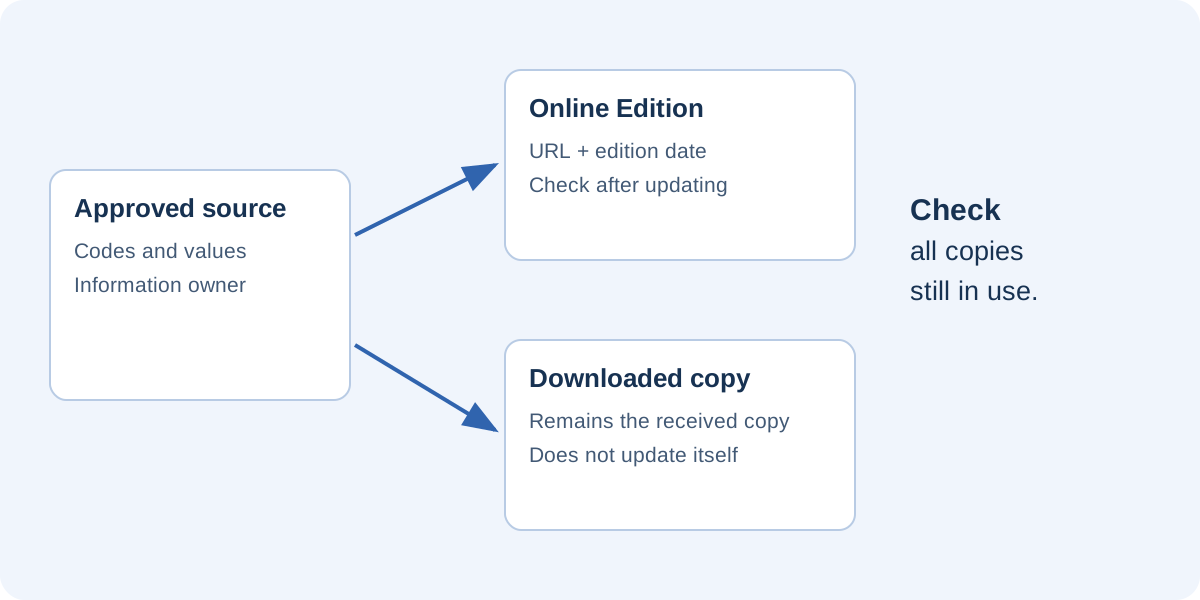
Establish where product codes, descriptions, prices and selling units are approved. This might be a management system or a controlled register. What matters is knowing which source takes precedence. The design should receive verified data rather than becoming a separate place where every contributor changes values independently.
For each item, record its identifier, name, variant, relevant unit and commercial reference. Add a status such as active, replaced or awaiting verification. This is particularly useful when a product retains a similar name but changes code. Searching only by description can leave obsolete photographs and links in circulation.
Product identifiers are not page numbers
A page number is an editorial position, not a permanent product identifier. Moving a section should not make the item unrecognizable. Use the product code to check correspondence between the register, specifications and catalog. Use page numbers only to guide readers within that particular edition.
Name editions clearly
“Furniture price list — October 2026” immediately identifies the period. A revision number can distinguish corrections within the same commercial edition. Avoid filenames such as “new,” “latest” and “final” without dates; they become ambiguous as soon as a second copy exists.
Put the edition inside the document as well as in its filename. A printed copy or forwarded screenshot may lose the original download name. Internally, record who approved it and which edition it replaces. Distinguish a layout correction from a change in commercial values so colleagues understand what actually changed.
Define a change process
A dependable change passes through a request, data verification, source update, output check and publication. In the furniture example, a product manager confirms specifications while a commercial manager approves prices. The person preparing the layout applies the change and identifies affected pages and destinations.
Do not update only the visible number. Check technical downloads, buttons, offer wording and translations too. When duplicating an entry for a new item, verify its URL and code alongside its photograph. A visually accurate page can still lead readers to the wrong product specification.
Decide what should remain stable
A stable public address simplifies updates, but readers must still be able to identify the edition. Make it clear whether they are viewing the current list or an archive. If older editions remain available, separate them from the main route and label their status.
A downloaded file does not change when you update the website. For important commercial revisions, consider how relevant recipients should be informed through suitable channels. Do not attribute automatic updating of local copies to a viewer that does not provide it. The flipbook can improve access to the published edition without controlling every distributed copy.
Test the process with a real change
Before adopting the workflow, simulate an update to one representative item. Change a value in the source, regenerate the publication and visit the address previously shared. Check that the new value appears on the right page and that its links still open the correct resources. Keep the previous edition for an internal comparison.
A short acceptance list can confirm that:
- Product code and name match the approved register.
- Units and conditions are understandable in context.
- Edition dates agree across formats.
- Linked resources have been updated or explicitly confirmed.
- The public route does not show two conflicting “current” editions.
Preserve the project for handover
Keep editable sources, photographs and the project where another person can continue the work. The reader file may not contain everything needed to edit the publication. A handover record should identify the public URL, source location, data owner and procedure for replacing an edition.
In FLIPBOOKPRO, the .pdfinflip project supports further editing, and a hosted publication can be updated from the correct open project. The online update guide explains the command. The organizational requirement is independent of the application: one clear source, identifiable approval and checks of active copies reduce ambiguity for sellers and customers alike.
Found an error or an unclear passage? Contact FLIPBOOKPRO, and include the article address and the passage concerned.