In this article
A public URL does not by itself make a catalog easy to distribute. Readers need to understand what they are opening, recognize the edition and find a useful next action. Email links, website buttons and printed QR codes provide different entrances to the same content, each with its own context and limitations.
Imagine a shop promoting a seasonal selection at the counter, on its website and through customer communications. The catalog is already published. The next decisions concern the address to share, the accompanying message and what should happen when the edition changes.
Choose a direct link or an introductory page
A direct viewer link removes a step and works well when the context is already clear. An introductory page can explain the publication, identify its edition and provide alternatives such as a download or contact information. Choose according to what readers know before arriving, rather than applying one rule to every campaign.
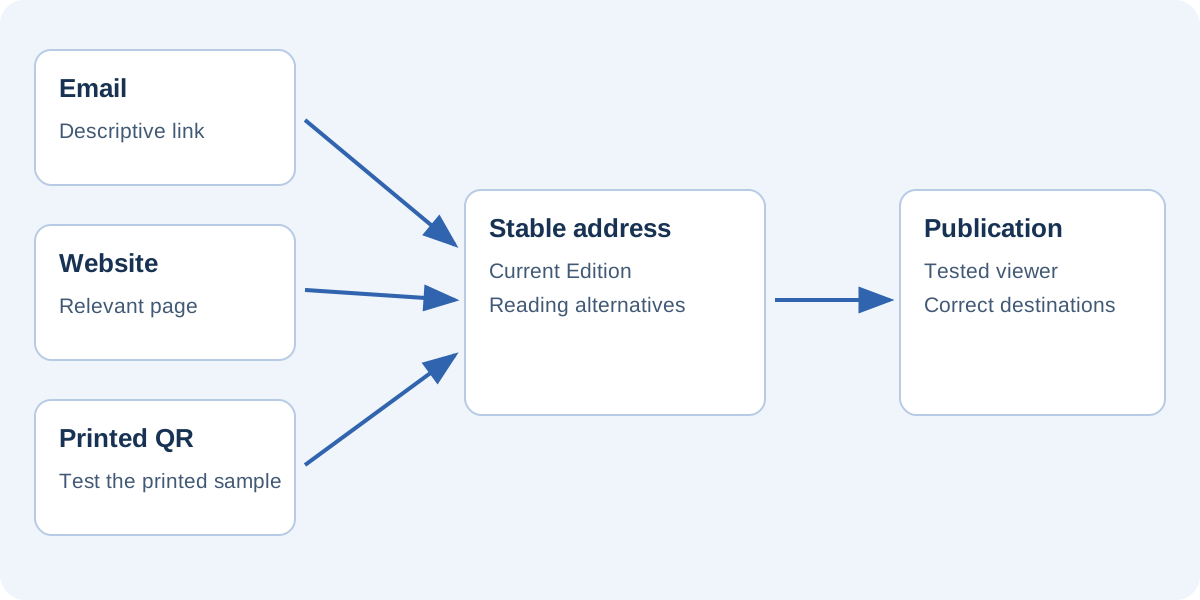
For a counter display, the QR code might open a stable shop page identifying the collection and linking to the current catalog. In an email specifically introducing that collection, a direct link may be sufficient. Avoid intermediate pages that add a compulsory click without providing useful information.
Retain control over distributed addresses
Printed material may outlast an individual publication. An address managed on your own website can allow you to replace the destination or update the introductory page when the catalog changes. You must maintain that route and verify redirects: a stable address does not take care of itself.
If you use an external QR or short-link service, check how it works before printing a large quantity. Management may depend on an account or service limits. A static QR code contains data, commonly a URL. Updating the website reached through that URL differs from changing the data encoded in the printed symbol.
Include a readable alternative to the QR
Explain what the reader will get. “Browse the autumn collection” communicates more than “Scan here.” Where practical, provide a short written address for people who prefer typing or cannot use their camera. The QR code should not be the only route to the information.
Print a sample at its final size and test the actual material. Distance, lighting, reflections and folds affect scanning. Keep the symbol clear of decorations that impair recognition and ensure it prints sharply. Do not approve a physical display solely by looking at an enlarged screen preview.
Test before ordering the print run
Ask someone unfamiliar with the project to scan the sample. Can they understand the invitation, reach the correct page and find the selection? If they encounter an unexplained technical screen first, improve the journey even if the camera recognizes the code perfectly.
Adapt the message to its channel
In email, use a descriptive link and briefly explain why the catalog is worth opening. Do not assume an HTML attachment behaves like a normal website. Mail applications handle attachments and active content differently. A public URL is usually a simpler route to browser-based consultation.
On your website, place the catalog near relevant information and identify its edition. On printed displays, avoid long text few people will read before scanning. Still include enough context to identify the publication: collection name, the business presenting it and any relevant period.
Measure only what you can interpret
If you distinguish channels with URL parameters, choose consistent names and avoid including personal or confidential information. Parameters alone do not create a report. You need a system that records them and a configuration appropriate to applicable consent choices. Do not introduce tracking merely to have a number to display.
Distinguish opening a publication from reading it or taking a commercial action. A visit does not prove every page was read; a click is not a sale. A small shop may learn enough from enquiries and the links customers use without building an analysis system disproportionate to its purpose.
Plan for the end of the campaign
When a selection expires, decide whether to archive it, replace it or guide readers to a new edition. Printed QR codes may remain in circulation. A page explaining that an offer has ended and linking to the current selection is more helpful than an unexplained error.
Keep a record of distribution points: website pages, communication templates, counter cards and promotional material. That register makes updates less dependent on memory. When a viewer address changes, test the complete path from the original material rather than only opening the newly created destination.
Check the final action too
Open links on both phone and computer, visit an internal page and try a product or contact button. These final steps determine whether the journey works. A polished cover does not compensate for incorrect destinations or an outdated price list.
The publication checklist can guide this review. With FLIPBOOKPRO, keep the editable project and verify whether the existing address is retained when you update a hosted publication. Reliable distribution combines a clear message, a manageable address and tested destinations. The QR code is simply one way for readers to enter that complete journey.
Found an error or an unclear passage? Contact FLIPBOOKPRO, and include the article address and the passage concerned.