In this article
A useful digital menu helps customers understand what they can order, what it costs and where to find the information they need. Visual effects come afterwards. Someone sitting at a table with a phone has different needs from someone browsing a restaurant brochure at home. They may have limited time, a weak connection and a reason to return repeatedly to drinks or desserts. Designing for that situation changes the format, navigation and order of information.
Consider a restaurant offering starters, first courses, main courses, desserts and a separate drinks list. Its seasonal menu should be recognizable and easy to maintain. The aim is not to reproduce every printed decoration on a phone, but to preserve identity and clarity.
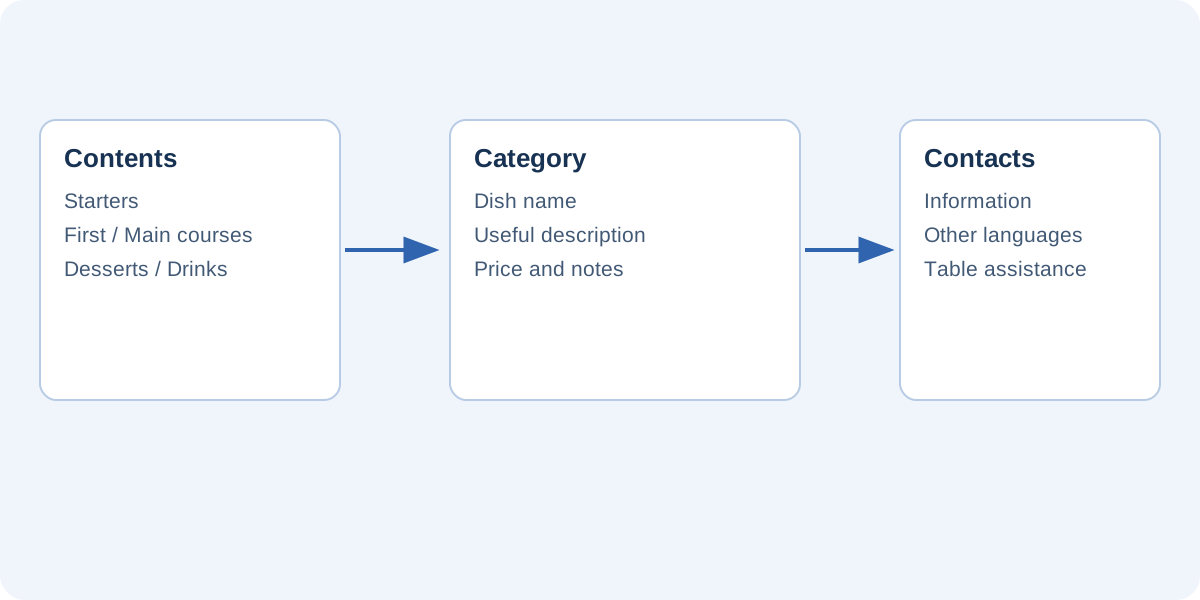
Create categories that help customers order
Use predictable names for the main sections. A creative label can accompany “Starters,” but should not remove every familiar reference. Keep the same order of information throughout: dish name, useful description and price. Present additions, supplements and available options close to the item they concern.
A contents page helps when the menu spans several pages. If you add internal links, give categories clear boundaries or their own pages. Recheck destinations after inserting a seasonal page. A “Desserts” link opening the main courses is less useful than a non-interactive contents page that remains correct.
Write for quick consultation
Descriptions should distinguish dishes. For a mushroom risotto, the ingredients and a distinctive preparation may be helpful; a generic sentence celebrating tradition adds less information. Avoid giving every dish a long promotional paragraph if it makes alternatives harder to compare.
Prepare a consistent entry containing:
- A dish name clearly distinguished from the description.
- Ingredients and characteristics confirmed by the restaurant.
- A price and the relevant unit where needed.
- Pertinent notes and an indication of how to ask staff for clarification.
This article addresses editorial organization. The restaurant must verify the accuracy of food information and any applicable requirements. A symbol or sentence inherited from a design template does not replace that responsibility.
Choose a page that works on a phone
A portrait format with one column often makes a list easier to consult. A printed two-column menu may require constant zooming when reproduced as a fixed page on a small screen. Before designing every category, make one sample containing the longest dish name, a two-digit price and an additional note.
Open the sample on a phone and ask someone to find three dishes without instructions. Observe whether they must rotate the device, enlarge every line or search repeatedly for prices. This is a simple usability check, not a statistical study. Its purpose is to identify obvious obstacles before repeating them throughout the menu.
Do not rely only on color
A colored symbol may help, but pair it with an understandable text legend. Ensure adequate contrast between the background, names and prices. Photographs behind menu entries may impair readability even when they look attractive on a monitor. Keep large decorative images on the cover or introduction when they do not help customers choose a particular dish.
Point the QR code to a manageable address
A QR code printed on a table contains an address; it does not update the menu by itself. Pointing it to a stable page on the restaurant’s website can let you replace a publication without immediately reprinting every card. Avoid relying on a temporary address you cannot maintain.
Print a short readable URL beside the code, together with an explanation such as “Current menu.” Test a physical sample at the intended size and with the chosen finish before ordering a large print run. Reflections, folds and poor contrast can prevent scans that worked perfectly on a computer screen.
Keep language editions aligned
For a restaurant serving different audiences, an initial language selection page may be clearer than repeating every entry several times in one document. Each translation should describe the same dishes and prices. When a dish changes, record all editions that need updating.
Maintain a central list before layout and give each dish an internal identifier. This helps compare language versions even when names differ. Do not automatically reuse old descriptions: an ingredient change may require more than a revised title. Someone familiar with the actual menu should take part in the final check.
Define a reliable update process
Keep the editable project, identify the edition and assign responsibility for approving prices. A simple process can include editing, checking by the responsible person, publishing and testing the existing QR code. Record expiry dates for temporary offers. Forgetting to remove an offer is a maintenance problem rather than a limitation of the document format.
For a flipbook, test the public address as well as the editor. Check every category, internal destination and final page. FLIPBOOKPRO can prepare a publication, but it is not an ordering system and does not automatically synchronize kitchen stock or availability. The online publishing guide explains the relevant workflow.
Finally, retain an alternative such as staff assistance, a printed menu or a text version on the website. Customers should not have to own a smartphone to obtain essential information. Digital publishing works best when it adds convenience and supports reliable updates without creating new barriers to service.
Found an error or an unclear passage? Contact FLIPBOOKPRO, and include the article address and the passage concerned.