In this article
A catalog can fit a window without becoming comfortable to read. Reducing a fixed page to the screen width also reduces its lettering. Zoom is useful, but repeatedly enlarging every price or description makes comparison slower. Mobile design therefore begins with information hierarchy, not just the presence of a zoom control.
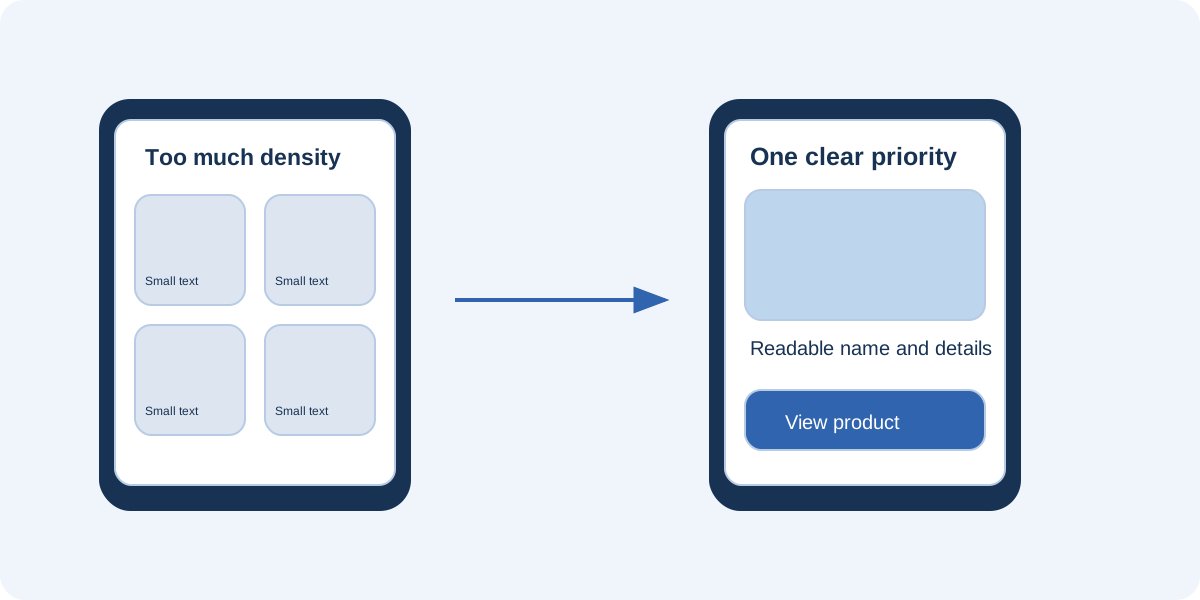
Consider a home-accessory collection whose original brochure places four products on each page, with photographs, descriptions and variants. A phone edition does not necessarily need a different visual identity. It needs a clear decision about which elements belong together and which should be separated to make choosing easier.
Choose the main task
Ask what readers should achieve in the first thirty seconds. Are they exploring a collection, looking for a previously seen item or checking a price? Each goal suggests a different route. A photographic opening can encourage exploration; recognizable category names and a contents page help people searching for something specific.
Do not ask a single page to tell the company story, list every variant and collect a sales enquiry at once. Give each section a primary purpose. For the accessory collection, an interior photograph might introduce the range, product families organize it, and individual entries provide details needed for comparison.
Reduce density without losing useful details
If four entries become unreadable, try two or one per page. More pages may be acceptable when each step becomes clearer. This is not an automatic rule: an excessively long sequence can make returning to an item difficult. Balance the rhythm with a usable contents page and recognizable product names.
Remove repetition and decoration before removing information needed for a decision. A promotional message shared by every item can move to the introduction. Dimensions, materials and variant differences should remain close to the relevant photograph. This saves space without forcing readers to search elsewhere for what matters.
Establish a consistent visual hierarchy
Use a predictable sequence on each entry: name, image, features, price where appropriate and next action. Keep labels near their values and make it clear which description belongs to which product. Alignment and space between groups often help more than a collection of differently styled borders.
Make button labels explain their destinations
“Ceramic vase details” is clearer than several indistinguishable “Click here” buttons. Leave space between interactive targets and confirm that the active area matches the visible button. In a publication imported from PDF, the printed button may be only artwork. Test its actual behavior in the final viewer rather than assuming its appearance proves it works.
Do not depend on two-page spreads
A composition spanning two pages may work on a monitor. A phone may show one page at a time or a greatly reduced spread, depending on the viewer. Avoid splitting sentences across pages, separating prices from their photographs or using references understandable only when the whole spread is visible.
Give each page enough context to stand alone. If a panoramic image extends across two pages, do not make it the sole source of essential information. Provide a caption understandable on either page and check how the transition behaves with the phone held vertically.
Test with specific tasks
Asking whether someone likes the design produces an aesthetic opinion, not evidence of usability. Instead, ask them to find an item below a particular size, compare two materials or open a product page. Observe where they stop and which gestures they must repeat.
For an initial check, confirm that:
- Product names and descriptions do not require constant magnification.
- Readers understand how to move forward and return to the contents.
- Buttons are distinguishable from decoration.
- External destinations are predictable.
- Readers can return to their place after following a link.
Write down observed obstacles before revising the design. A new color scheme will not solve a problem caused by lettering that is too small. Changes should address the specific difficulty you observed.
Check the connection and surrounding page
A catalog may open directly or inside a website page. Test both arrangements. A short iframe can leave little room for controls, and overlapping elements can cover navigation. Try portrait and landscape orientations, remembering that many people will not rotate their phones unless the reason is clear.
Also test an initial visit that does not depend solely on cached resources. You do not need to invent a universal loading promise; establish whether the intended route is usable under the audience’s normal conditions. If images are heavy, follow the file-size reduction guide before compressing everything indiscriminately.
Offer an alternative route
A store link, an HTML page with the main details or a carefully prepared downloadable document can help readers who struggle with the viewer. Not everyone wants to browse pages, and not everyone can comfortably use the same interface. Label alternatives clearly rather than hiding them in an unfamiliar menu.
FLIPBOOKPRO provides preview and publishing tools, but you still need to test the exported publication. A preview mode is not a substitute for checking the public output on a phone. The publication checklist helps organize that final review. A successful mobile edition preserves important information while reducing the actions required to understand it, rather than merely shrinking a desktop layout.
Further documentation
Found an error or an unclear passage? Contact FLIPBOOKPRO, and include the article address and the passage concerned.