In this article
Many publication errors survive because the review concentrates on the cover and overlooks content, links and maintenance. A document can look orderly while containing an old price, an unauthorized photograph or a button copied from another product. A dependable process separates preparation, approval and checking the public result.
Imagine a small business with one person responsible for product information and another preparing the publication. It does not need an elaborate editorial system. A clear register, identifiable responsibilities and checks tied to real tasks can make publication repeatable without turning every minor correction into unnecessary administration.
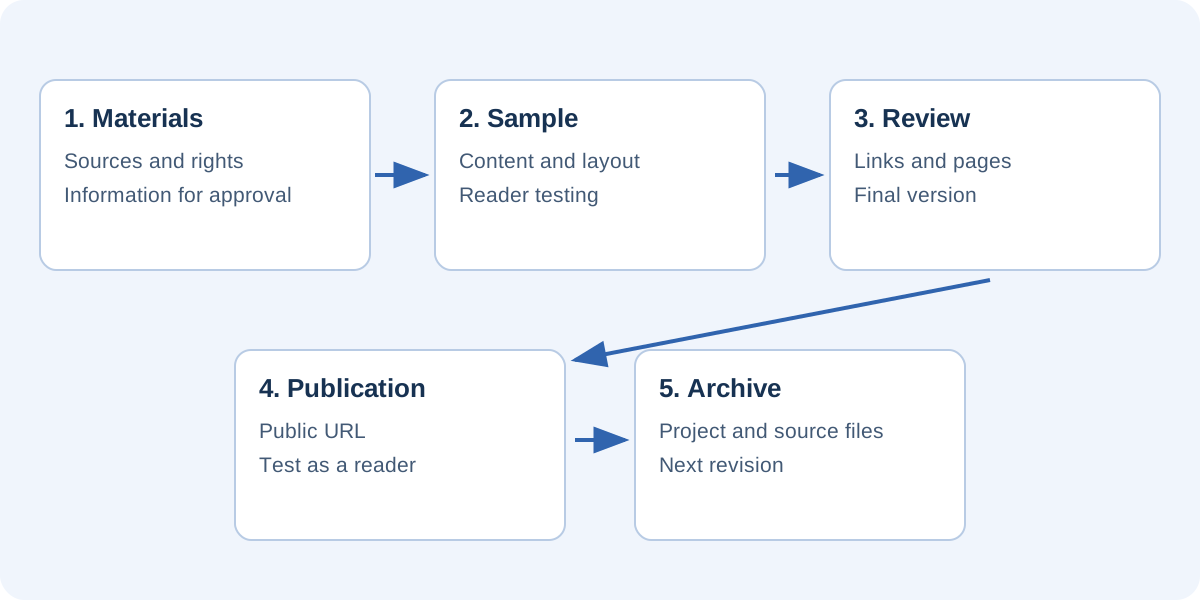
Define the content and audience
Write down the document’s purpose, intended readers and next action. A brochure might explain services and support enquiries; a catalog might help readers compare a selection and visit product pages. This brief distinguishes essential information from material that can reasonably be provided through another resource.
Collect the materials and flag missing information. Distinguish confirmed data from examples so a layout demonstration cannot accidentally become a published offer. Sample prices, temporary destinations and photographs awaiting replacement should remain recognizable within the working process even when the page looks finished.
Maintain a source register
For each group of facts, record its origin and who can approve it. Product specifications, company contacts and photographs may require different checks. Do not pretend that one source confirms everything when responsibility is genuinely distributed across the business.
Keep product or service information separate from its visual position. An identifier helps you locate an entry after it moves to another page. Record associated resources too: specifications, sales pages, video and downloads. An update is complete when relevant linked materials have been checked, not merely when the catalog’s visible wording changes.
Approve a representative sample
Prepare a few pages representing the main challenges: an introduction, a dense information page and one containing interactions. Ask someone knowledgeable to verify terminology and facts, and someone unfamiliar with the project to find a specific item. These checks address different questions: accuracy and ease of understanding.
Record findings precisely. “The lamp entry omits the measurement unit” identifies a correction. “The catalog needs work” does not. Approving a representative sample before duplicating layouts prevents the same defect from spreading through the complete document.
Separate content review from visual review
First inspect names, values, conditions and destinations. Then review spacing, contrast and consistency. Searching for every kind of defect simultaneously can draw attention to obvious visual details while a wrong digit goes unnoticed. The important issue is knowing which check you are performing, not necessarily involving a large team.
Test interactions as a reader
In an editor, clicking an element may select it rather than follow its link. Test destinations in the reader preview and final output. Duplicated entries deserve particular care because they often retain information and URLs from their starting page.
For each button, check whether the wording explains the action and the destination is correct. Play videos instead of merely confirming their thumbnails. Recheck contents links after reordering pages. If the viewer or plan restricts an interaction, identify that restriction before distribution. Being able to draw an element in an editor does not prove it will behave as intended for readers.
Inspect the public address
Visit the publication from another device and check the cover, an internal page and the last page. Test access from the website, shared link and any QR codes. This can reveal missing files, incorrect permissions and references that work only on your own computer.
On a phone, inspect small text, controls and links. For an embedded catalog, verify that the frame does not cover navigation and that a direct alternative link exists. Review external resources too. An outdated download can contradict a new edition even when both are technically reachable.
Archive what is needed to continue editing
Keep the editable project, original sources, images and edition details. The reader output is not necessarily the only file required for future work. Record where the project lives and which edition matches the public address. “Final” is an unreliable filename once several updates have been made.
A short handover record can include:
- Publication name, edition and public URL.
- Location of the project and original materials.
- Content owner and approval date.
- Items to recheck during the next change.
- Expiry dates for temporary offers or information.
This makes the workflow less dependent on one person’s memory. Someone returning to the task after a break should be able to identify the current files without reconstructing the publication history from scattered messages.
Establish the next review trigger
Not every catalog needs weekly updates, but each should have a review rule appropriate to its contents. A price change, new season or replacement product can trigger a check. Recording those triggers is more useful than making a vague promise to keep everything continuously current.
After a correction, revisit the address already shared and inspect the actual result. In FLIPBOOKPRO, save the project first and update the corresponding publication. The operational checklist can support the final test. A useful editorial process lets another person understand what was approved, which edition is online and what must happen to keep it reliable.
Found an error or an unclear passage? Contact FLIPBOOKPRO, and include the article address and the passage concerned.